How Quillify works
Five steps, from describing your organization once to tracking what you won. Each one also says what you still do, because the parts only you can supply are the parts that decide whether you win.

The loop
The middle three steps are why people pay for Quillify. The first and last are what make the middle three keep working, month after month.
Describe your organization once
Tell Quillify what you do, who you serve and where. Nonprofits can skip most of it: type an EIN and the profile fills itself from the IRS registry, including whether your 501(c)(3) status is currently active.
What stays yours: You confirm it is right. Everything downstream depends on this being accurate rather than aspirational.
See who actually funds work like yours
Search grants, federal and state contracts, foundations and community lenders in one place. Add a peer organization and you get every foundation on file that funds them, and which of those have not funded you yet.
What stays yours: You decide which are worth your time. Each match carries a score AND the strategy it was found under, so the number is something you can interrogate rather than something you have to trust.
Find out what it takes before you commit
Ask "Am I qualified?" on any opportunity and Quillify reads the actual announcement, not a summary, and tells you whether you are eligible. Build a requirements checklist and you get every obligation up front.
What stays yours: You decide which to pursue, with the requirements in front of you.
Draft it from your own documents
Select the files that describe your work and Quillify writes the proposal from them. Ask for changes in plain language and it edits those sections only. Every proposal ships with a compliance checklist naming what your team still has to supply.
What stays yours: You supply the substance and you approve the result. The program design, the evidence and the relationships are yours, and they are what decide the outcome.
Keep track of all of it
Deadlines land on a shared calendar with reminders a week and a day out. Saved searches are re-screened against new postings. Every application you log builds a win rate you can actually show a board.
What stays yours: You submit through the funder’s portal. Quillify reminds you a week and a day out.
What Quillify is watching while you work
You do not have to go looking. Saved searches are re-screened against new postings and the matches come to you. Policy moves too: funder and agency announcements matched to your organization type, refreshed daily, each with a plain-English note on why it matters. Major changes are flagged, meaning policy or funding shifts that affect many programs at once.
- foundations that accept applications
- 20,000+
- open grants
- 4,700+
- open contract opportunities
- 12,000+
- community lenders
- 480+
What it costs to try
Browsing, keyword search and tracking deadlines are free. The work Quillify does for you is paid for in credits. A proposal’s cost is calculated from your own documents and shown on the button before it runs. See exactly what each action costs.
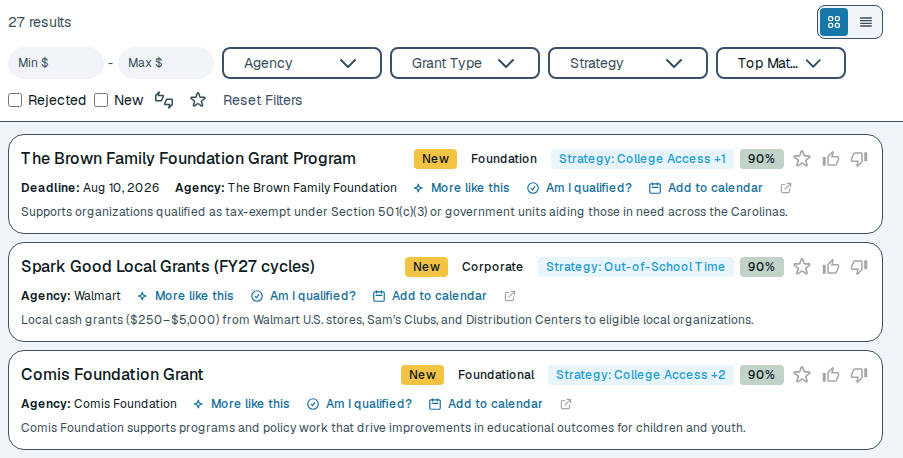
Every match shows why it matched
Matched opportunities, each with the score, the strategy it was found under, and the three things you can do with it without leaving the row.
What people ask before they start
“AI drafts all sound the same.”
Quillify writes from your own documents: past proposals, budgets, bios and results. The draft carries your facts and your voice.
“I’ll spend longer fixing it than writing it.”
Our customers used to spend 200 to 250 hours on an SBIR. With Quillify it takes about 5, from go decision to submission. Read their stories.
“My documents will end up training someone’s model.”
Your content is never used to train foundation models. See the security model.
“I don’t know what it will cost me.”
Searching is free. Quillify shows the cost of every draft before it runs. See pricing.
Start with what you are eligible for.
Set up your organization in about a minute, then look before you spend anything.
No card required. Already have an account? Sign in